Showing posts with label Image Edit. Show all posts

Tuesday, September 16, 2008

LunaPic (Photo Editor)

http://www101.lunapic.com/editor/

Recently my friend recommend this free online photo editor to me & I have try this website out. Well, this LunaPic really provide lots features adjust photo, add effects to our photo & add animation easily. Beside, this website also supported Image & Video Types: GIF, JPG, BMP, PNG, AVI, MPG, FLV, RM and etc. Yet, the max total upload size is 2.0 Mb. Thus, large images take longer time to upload.
This web photo editor is also linkable to Facebook, PhotoBucket, Flickr, Picasa & MySpace,com, thus these user can upload their photo from their existing account for editing.

Sunday, May 25, 2008

Manipulate Your Photo into Different Character: FaceInHole.com


Have you ever think of to be a different person? We always have the curious of how will we look like with a different hair style, in a famous photo or even in CD cover page. Recently my friend has recommend me this awesome website >> http://www.faceinhole.com/home.asp . This is really cool and now it’s not a hard work to manipulate photo just for fun. As with FACEinHOLE.com, we can create “new appearance” for ourselves just in few steps. What we need to do is just select a scenario, upload and adjust your photo. The most excitement part is that: this is absolutely free. Try this out!

Wednesday, May 7, 2008

Want to be virtual cover page model?

It's really simple, goto this website: http://www.magmypic.com/ , then browse your photo that you wish to appear in the magazine cover page. After that, you can choose which magazine you would like your foto to be shown. Lastly, select the photo size then you can right click on the photo and save into your pc.

Step 1: Just browse your photo or image from your pc and then upload into MagMyPic website.

Step 2: After upload, the photo or image selected will be appear on the cover page in MagMyPic. As you can see as below, there are more than one cover page with the photo selected. So, simply choose on the magazine cover page that you prefer.
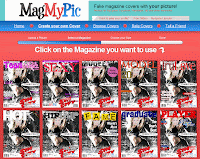

Step 3: Select the size of the magazine cover page.


Step 4: Finally, you have your own magazine cover page. Of course, you still can copy the code shown into your blog. It's cool!